






 Winner
 EASE OF USE
 END-TO-END WORKFLOW
 FULL-STACK CONTROL
 WEBSITE PUBLISHING
 Deciding factor


Lovable vs Bolt.new (2026): Which AI App Builder Is Better?
Lovable and Bolt.new make it possible to create functional applications using AI, but choosing between them is not simply about typing a prompt and looking at the result. The more important questions concern workflow, code access, integrations, collaboration, operating cost, deployment and long-term maintenance.
This WebKepler comparison focuses on web-product teams, SaaS founders, designers and developers. It combines structured category tables, interactive graphs and concise Verdict Cards. Each card is generated by the installed Comparison Engine, so it remains tied to the current data rather than becoming a separate, outdated HTML advertisement.
Quick answer: Lovable is our overall recommendation for teams primarily building web applications. Bolt.new is often a better fit for developer-led projects that prioritize design imports, source-code visibility or deeper runtime control. Category-specific winners can differ from the overall winner.
Pricing context (checked October 27, 2026): Both platforms list Pro plans starting at $25/month on their official pricing pages. Usage limits, collaboration rules and enterprise features differ; always recheck before subscribing.
Lovable vs Bolt.new at a Glance
Lovable and Bolt.new both transform natural-language requests into working software, but they prioritize different stages of product development. Lovable is geared toward a cohesive web-product workflow: designing an interface, connecting services, collaborating and publishing. Bolt.new exposes more of the developer environment, including files, runtime tools and design-to-code entry points.
Our overall recommendation: Lovable is the stronger starting point for most web-first founders and product teams. Bolt.new deserves the edge when a project depends on Figma imports, code-level iteration, or a technical workflow that reaches beyond ordinary website generation. This is an editorial recommendation based on the capability matrix below, not a universal performance benchmark.


 $50/mo Business · unlimited users
 $30/member/mo TeamsNo native Figma-frame import documentedNative Figma-frame importWeb applications onlyExpo-compatible mobile apps134 live connectorsContext connectors + MCP integrationsSOC 2 II · ISO 27001 · GDPR · AIUC-1SOC 2 II · GDPR · CCPAAWS & Azure private previewBYOK in AWS / AzureCloud dev servers / preview sandboxesWebContainers client-side runtime
Core Platform Snapshot
Metric-specific comparison

The headline winner is not a substitute for the individual category results. Some of the most important Bolt.new advantages appear in technical categories further down this page.
Build Workflow, Runtime and Day-to-Day Editing
The quality of an AI app builder becomes apparent after the first prompt. A usable workflow should let you inspect changes, correct individual elements, keep the project running, and move from prototype to implementation without repeatedly starting over.
Bolt.new puts project execution, preview and developer tools close together. Lovable takes a more guided approach, particularly when refining a web UI visually. Both can iterate; the difference is how much of the underlying development environment is directly available.
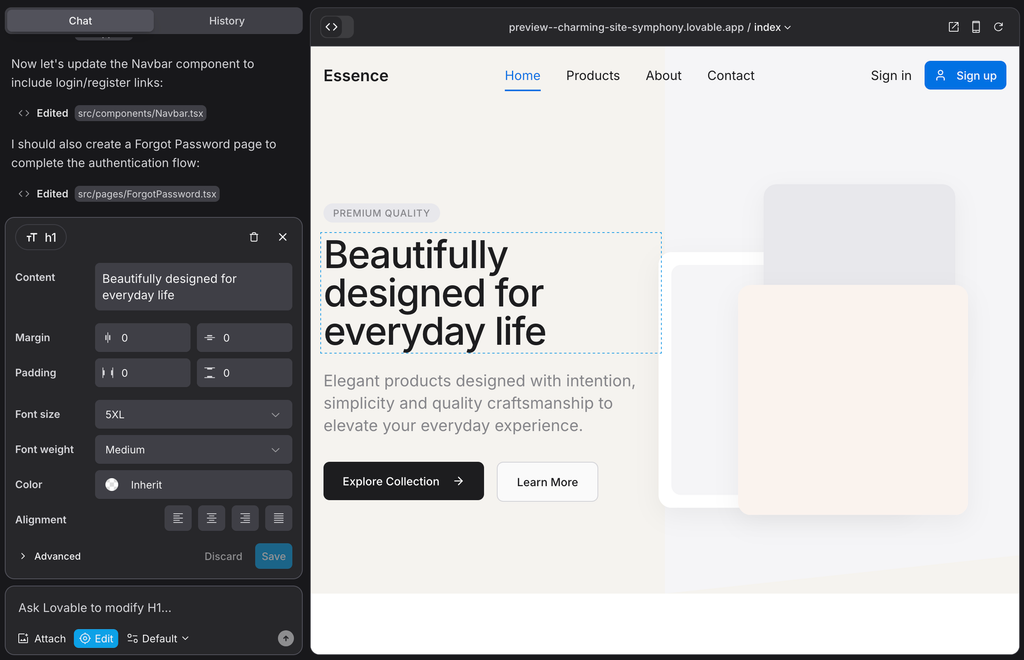
Lovable visual editing controls for direct interface adjustments.
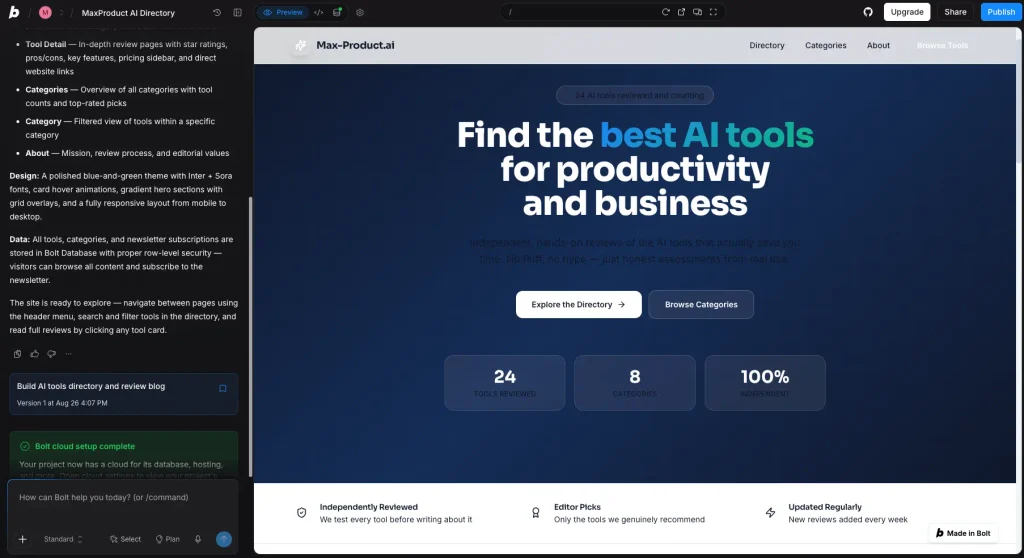
Bolt.new workspace with AI conversation and a live preview.
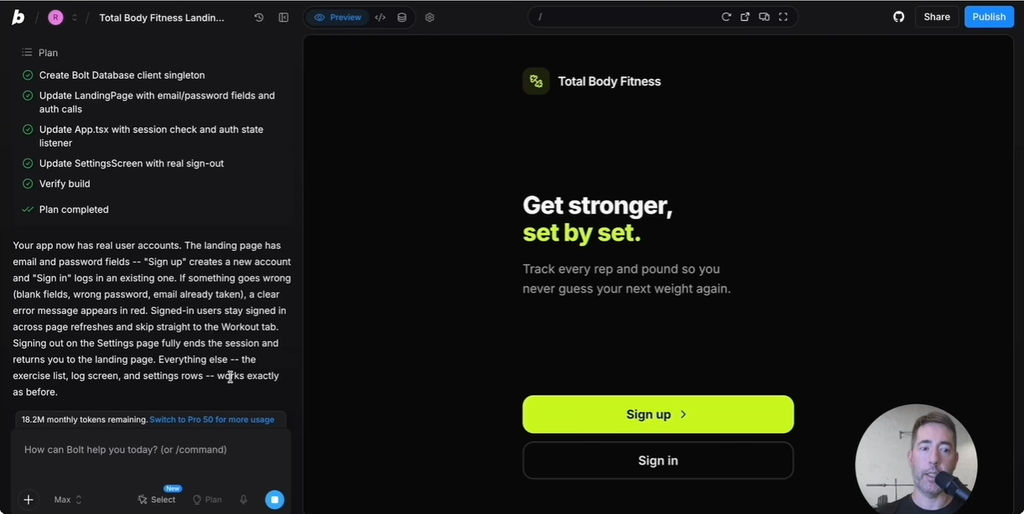
A planned project implementation flow inside Bolt.new.
Cloud-hosted dev serversWebContainersNo native frame import documentedFigma importWeb outputExpo mobile workflowManaged Lovable agent routingStandard · Max · ForgeNot a highlighted core controlSupportedGitHub / generated sourceBrowser IDE + generated sourceExcellent for rapid web-product iterationBroader developer runtime and build controlsBuilder Workflow Capability Map
Documented availabilityBolt.new earns this category in our comparison for its engineering-oriented workspace. Lovable may still be faster for a nontechnical user making focused visual changes, so the winner depends on the task rather than an independently timed speed test.
Company and Platform Profiles
The provider profile organizes the factual and structural differences that are easy to lose in feature marketing: platform orientation, product surface, deployment paths and the kinds of users each company addresses. It is primarily a reference table rather than a contest.
Read these details alongside the rest of the comparison. Founding date, headquarters and company background may help establish context, but they do not directly indicate the reliability, security or long-term suitability of an application you build.
Provider Profile
Platform Surface & Context
Context, not an overall scoreThis section is intentionally neutral. We have not assigned a Verdict Card merely to force a winner from profile information.
WebKepler Category Ratings
Our category scores are an editorial comparison framework: they summarize product fit across features, workflow, value, support and other dimensions. They are not user-review averages and should not be interpreted as laboratory measurements unless the underlying methodology explicitly says otherwise.
Look for categories where the gap is meaningful rather than treating a small decimal difference as a decisive result. Lovable performs particularly well in the web-product experience, while Bolt.new has strengths in technical control and design-to-code.
WebKepler Category Ratings
Editorial rating · 5-point scaleUse these scores to prioritize which detailed section to read next, not to bypass the underlying feature and pricing evidence.
Deployment and Infrastructure
A generated application needs more than an attractive frontend. Hosting, databases, compute, deployment permissions and regional controls determine whether an experiment can become an operational service.
Bolt.new offers an expansive development and deployment route, while Lovable increasingly packages building and running web apps inside its own platform. Lovable also documents additional security and cloud deployment options for enterprise requirements. The correct choice depends on where the application must run and who will maintain the stack.
Cloud-hosted isolated dev serversClient-side WebContainersEnterprise private previewEnterprise BYOKEnterprise private previewEnterprise BYOKDedicated customer cloud data plane in previewNo shared compute in BYOK deploymentEnterprise EU inferenceNot highlighted as an equivalent platform featureStrong enterprise directionMore mature isolation-first deployment storyDeployment Path Coverage
Documented deployment pathsInfrastructure diagrams describe supported architectures; they do not, by themselves, establish uptime or latency. Request exact data-residency and contractual documentation before making a regulated deployment decision.
Free, Pro, Business, Teams and Enterprise Plans
Both products let users begin with free access, but their paid tiers are designed around different unit economics. In the published monthly pricing checked for this article, Lovable Pro starts at $25 per month and Bolt Pro starts at $25 per month. Lovable Business and Bolt Teams serve different collaboration and governance needs and should not be treated as identical tiers.
Compare the allowances, membership rules, publishing options, governance features and usage billing—not only the first number on the pricing page. Lovable pricing and Bolt pricing are the primary references.
Business $50 / month · shared workspaceTeams $30 / user / month · per-member allocationUnlimited members on BusinessEach Teams member billed separatelyBusiness: $50 excluding extra usageTeams: $150 excluding extra usagePlan Price & Team Cost Scenarios
Published list prices; estimated team spendPrices and included allowances change. Recheck both official pricing pages before publishing a purchase recommendation or quoting a renewal figure.
Pricing Reality: Solo User vs Team
A subscription for one developer does not predict the cost of a growing team. Lovable advertises unlimited users on its Pro workspace, while Bolt describes a per-member Teams plan. At the same time, AI generation usage can raise the effective operating cost on either platform.
The graph below compares the scenarios defined in the component data. Treat those scenarios as a planning model; they are not invoices or estimates of how many credits your next project will actually consume.
Business $50/moTeams $30/member/moUnlimited usersPaid per team member$50/mo$150/moOn-demand credit top-upsMove to a higher token tierBusiness tierEnterprise tierStronger multi-user economicsStrong solo Pro value but seat-based Teams pricingTeam Cost as Seats Increase
Published monthly plan pricingIf several people will contribute to the same web application, collaboration economics can outweigh small differences in the headline plan price.
Plans, Credits and Usage Resources
Lovable uses credits for its building workflow and separates some application-running consumption; Bolt describes AI usage primarily in tokens. The numbers are not directly interchangeable. A credit from one service is not equivalent to a token from another, and neither is a reliable measure of finished features.
For a realistic cost test, define the same application specification, record the prompts and revisions, and compare the resources used to reach the same acceptance criteria. Account for cloud consumption and third-party APIs where applicable.
No published daily Pro build capNo daily token limit on Pro20 Cloud credits/monthHosting included with request limitsIncluded on ProTeams design-system knowledgeIncluded on ProTeam access managementYesEach paid member gets own token allocationEnterpriseTeamsBusinessEnterprisePlan Capability Availability
Published plan featuresA plan comparison is most useful when it separates fixed subscription costs from variable building and running costs.
Feature Matrix: What Each Platform Can Actually Do
Both platforms offer AI-assisted application generation, previews and deployment-related tools. Differences appear in how deeply they support specific work: visual adjustment, source-code interaction, connectors, design import, governance, and cross-platform paths.
Lovable’s expanding connector catalog is relevant when an app needs access to the tools a business already uses. Bolt.new may be a better fit when your team wants more direct involvement with the code and its runtime.
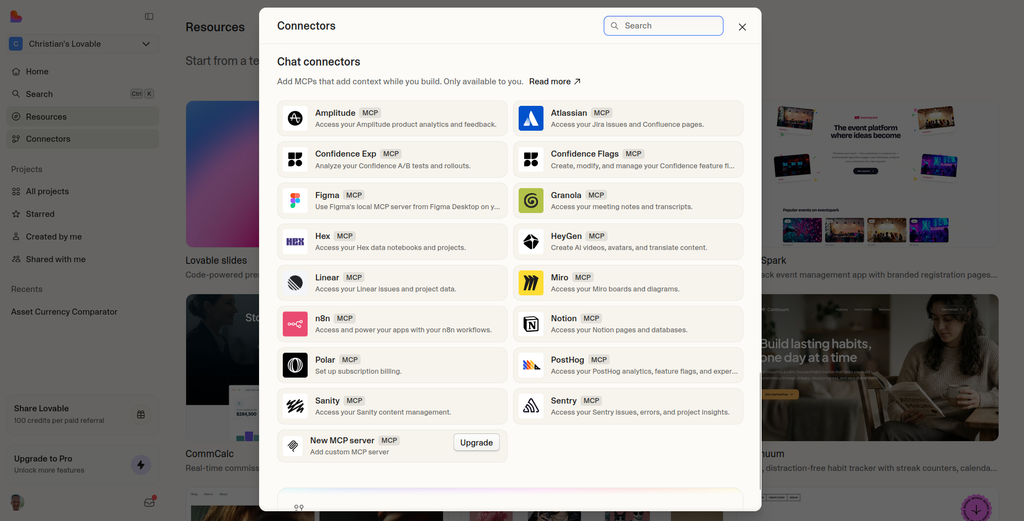
Lovable connectors help bring external tools and context into projects.
134 live connectorsContext connectors / MCP integrationsNo native frame import documentedYesNo native mobile outputYesConnectors can run offline / background jobsWorkflow integrations availableBuilt-in growth planning and execution toolsNot a core Bolt positioningSelected Feature Coverage
Documented availabilityFeature checkmarks should always be read with their qualification: plan availability, configuration work and third-party dependencies can make two superficially similar checkmarks represent different real-world effort.
Support and Collaboration
Team productivity requires more than shared access to a project link. Roles, permissions, support channels, review workflows, and administration affect whether a company can safely involve designers, operators and engineers.
Lovable’s web-product-oriented workspace can simplify cross-functional collaboration. Bolt.new offers a team-oriented path for organizations that work directly around development tools. Compare published plan entitlements rather than assuming every enterprise feature exists on entry-level tiers.
Email supportStandard product supportPriority supportTeams supportCustom SLA / enterprise support24/7 priority supportYes on Pro / BusinessTeams billed per memberBusinessEnterpriseBetter economics and earlier governance featuresStronger enterprise escalation modelCollaboration & Governance Access
Feature availability by platformFor a business-critical application, assess documented escalation channels and response commitments separately from the product’s ability to generate code.
Security, Data Boundaries and Deployment Isolation
Security is about controlled access, protected secrets, validated permissions and safe deployment—not about the number of settings shown in an interface. Lovable’s official security overview describes identity management, role-based permissions, regional data hosting and security checks. Bolt.new also offers security-related enterprise capabilities, but exact contractual coverage should be evaluated for the selected plan.
The architecture shown below illustrates how an application may separate control, data and supporting services. It is an explanatory diagram, not evidence that a particular project has undergone an independent penetration test.
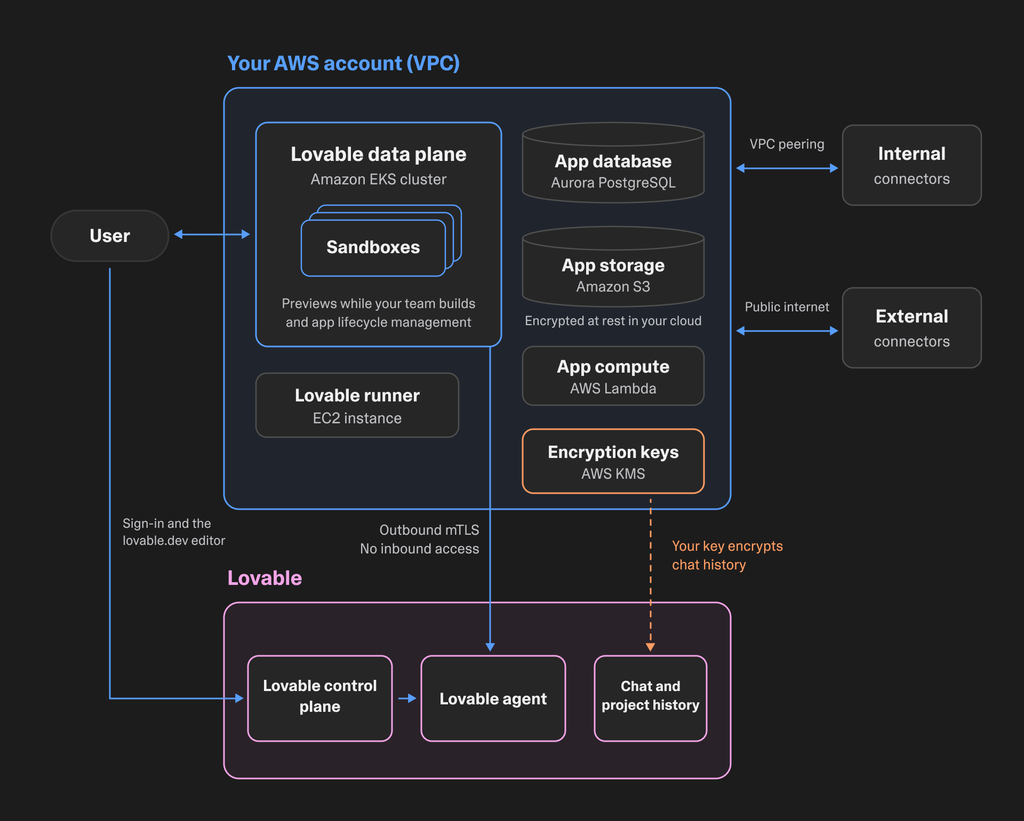
Diagram of one documented Lovable deployment architecture; not a benchmark or certification.
CertifiedNot listed in current Trust CenterCertifiedNot listedNot highlighted as certificationListedOn-demand deep scan + scheduled scans on higher tiersNot presented as equivalent scheduled deep-scan systemCloud sandbox architectureBrowser-level WebContainer isolationPrivate previewBYOK deploymentDedicated VPC / VNet data planeNo shared compute in BYOK modeApp/data plane in customer cloud; builder remains LovableEnterprise says code and prompts stay in customer infrastructureBroader published certification setStronger isolation-first deployment modelSecurity & Isolation Signals
Count, not a security scoreAsk each vendor about source-code access, secrets management, audit logging, retention, data location and security responsibilities before deploying sensitive customer information.
Mobile and Multi-Platform Development
A responsive website is not identical to a native iOS or Android application. Mobile strategy should begin with the intended distribution method and device capabilities, rather than a generic “mobile-friendly” feature label.
Lovable is especially coherent for web applications that also work on a phone browser. Bolt.new offers a broader developer-oriented pathway that can be more suitable for teams considering additional application targets. Verify current build, packaging and store-submission requirements before committing.
No native mobile outputYesNo native binariesExpo workflowNo native import documentedYesNot the primary workflowYesPlatform/server functionsSupportedBrowser-based builderMobile browsers not fully supportedExcellent for webClear winner for web + mobileWeb-product teamsBuilders needing multiple output surfacesCross-platform Output Coverage
Documented output surfaceIf native push notifications, deep device integrations or app-store distribution are required, test that exact end-to-end workflow rather than assuming it follows automatically from an AI-generated mobile layout.
What Lovable and Bolt.new Both Support
Both services have moved beyond simple prompt-to-landing-page demos. They support iterative app generation and workflows that can involve application logic, external services and production-oriented steps.
Shared capabilities matter because they rule out false differentiators. The more helpful question is not whether both products can generate a login screen, but how they let your team revise it, secure it, connect it to data and maintain it six months later.
Published Plan Price Ladder
Monthly list priceThis section has no automatic category-winner badge: the feature overlap is useful context rather than proof of superiority.
Lovable Pro vs Bolt Pro
The Pro plans are the most practical comparison for individual builders and early-stage teams. Both list a $25 monthly starting price, but they meter AI usage differently and provide different collaboration and workflow entitlements.
Check the current Lovable Pro plan and Bolt Pro plan for exact quotas. The value question is which subscription gets your intended project through design, development, QA and deployment with the fewest avoidable bottlenecks.
UnlimitedIndividual Pro subscriptionIncludedTeams featurePro Plan Capability Matchup
Published Pro featuresFor a web-first product team, Lovable has a compelling overall value proposition; for a technically demanding solo workflow, Bolt.new may provide more useful direct controls.
Building SaaS Products and Web Applications
SaaS applications typically need authentication, data persistence, business rules, payments, dashboards and user-facing account flows. AI generation is only the beginning; the developer must still verify access control, data ownership and error handling.
Lovable focuses on an integrated web-app workflow that can be attractive to founders and small teams. Bolt.new can create comparable web projects, but its more engineering-oriented interface may ask the builder to make more implementation decisions.
Native Lovable stackSupported through JS frameworks134 liveContext connectorsUnlimited users on paid team plansTeams per memberNo native mobile pathExpoBest fit for web SaaS and internal toolsBest if the product also needs mobile / deeper dev runtimeWeb SaaS Workflow Coverage
Selected capability availabilityFor a web SaaS MVP, optimize for the team’s ability to maintain the next ten iterations, not simply for how quickly the first screenshot can be generated.
Cloud, Backend and Runtime Flexibility
Backend flexibility matters when a project needs specialized packages, nonstandard runtime behavior or infrastructure choices outside a platform’s default path. A managed product can reduce overhead, while deeper control can make unusual projects possible.
This is a category where Bolt.new’s technical orientation has practical value. Lovable remains attractive when the priority is to minimize the decisions required to build and operate a conventional web application.
Platform/server functionsNative supported backend pathLovable Cloud / Supabase orientationChoice of database provider on ProNoYesAWS / Azure private previewBYOK AWS / AzureStrong managed web backendBroader backend/runtime flexibilityBackend & Runtime Flexibility
Selected backend pathsBefore choosing, map the backend’s non-negotiable requirements—database features, jobs, integrations, secrets and logging—to the current platform capabilities.
Figma, Visual Design and Design-to-Code
Visual editing an existing app and importing an existing Figma design are related but distinct tasks. Lovable’s Visual Edits are useful for selecting and changing elements in a running web interface. Bolt.new’s Figma import workflow is aimed at turning design frames into project code, including during an existing project.
Teams that begin from an approved Figma design should test how well real spacing, typography, assets and component structure survive the import process. A polished generated demo is not the same as faithful design-system implementation.
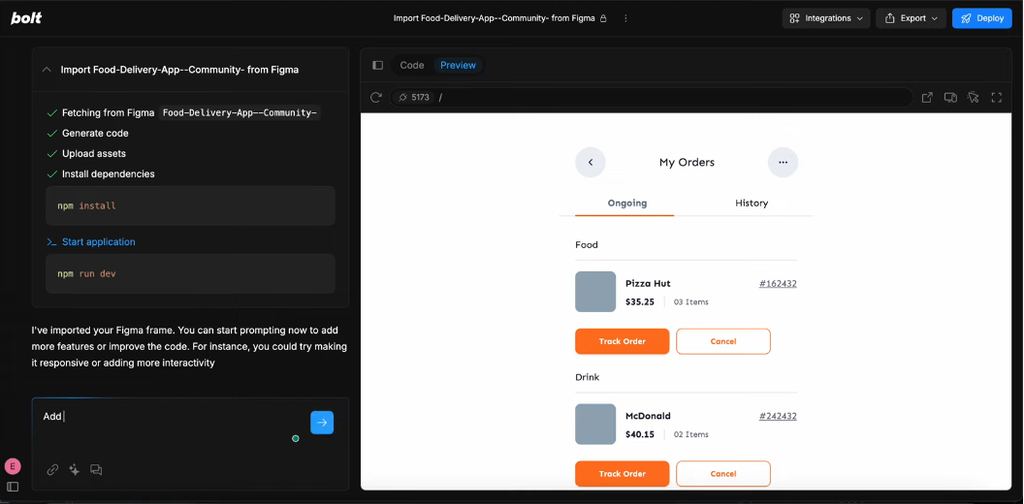
Bolt.new can import Figma frames while a project is in progress.
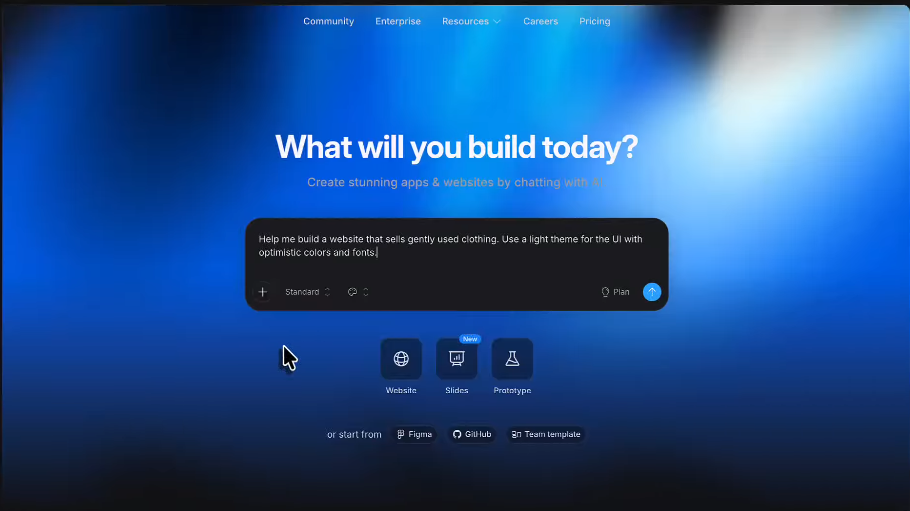
Bolt.new offers different starting points for new work.
No native import documentedYesMulti-element editing availableStack changes and send onceStrong visual-to-code mappingFigma-to-running-project shortcutExcellent visual editorBest direct Figma bridgeDesign-to-Code Capability Map
Documented design controlsBolt.new is the stronger match in this comparison for a workflow driven by repeated Figma-to-code handoffs; Lovable is very capable when the priority is editing a generated web interface.
Enterprise Governance and Administration
Enterprise buyers evaluate access provisioning, SSO, auditing, permissions, publishing controls and data governance. These capabilities often depend on specific plans and agreements, so a public feature table is only the first screening tool.
Lovable’s documented governance and deployment controls make it a credible option for enterprise web-product workflows. Bolt.new also has enterprise-oriented controls and support offerings. Procurement teams should obtain current written plan-specific terms from both vendors.
BusinessEnterpriseEnterpriseTeamsEnterpriseNot listed as equivalent recurring scanEnterpriseData governance controlsEnterpriseNot highlighted as equivalentEnterprise Governance Layers
Published enterprise controlsA strong governance result is not a security certification; verify compliance documents and operating procedures independently.
Workspace Management and Collaboration Economics
The size and composition of a team changes how an AI builder feels. A tool designed for a solo operator may become difficult to govern when designers, engineers, external contractors and stakeholders require different roles.
Lovable’s workspace-based collaboration pricing is attractive for teams that want many contributors involved in a web project. Bolt.new’s team plans may be preferable for developer-led organizations that value individual engineering allocations and technical administration.
Unlimited usersTeams billed per memberWorkspace identity controlsDomain whitelisting on TeamsBusinessEnterpriseBetter for larger cost-sensitive teamsStrong admin controls but per-seat pricingTeam Economics & Workspace Controls
Published team modelThe right comparison is total team cost and workflow fit, not the price of a single seat in isolation.
GitHub and Conventional Developer Workflow
Source-code portability and GitHub connectivity are essential if a project will be maintained beyond a single AI session. An experienced team needs code reviews, branching practices, backups and deployment processes that do not depend entirely on one chat interface.
Bolt.new’s browser-based development experience makes code-level work particularly visible. Lovable also offers conventional source-control pathways. Evaluate the exact sync, ownership, export and recovery processes with a real project before choosing.
GitHub-connected workflowYesGit sync workflowSupportedSyncs generated changesRuntime-checked edits can auto-pushNot the primary workflowYesEnterpriseTeamsStrong standard-code exportStronger in-builder Git workflowExcellent code portabilityBetter Git-centric developer experienceGitHub Developer Workflow
Documented Git controlsThe strongest workflow is one where the team can inspect, test and maintain the generated application even when the AI is not involved.
Agencies, Client Projects and Delivery
Agencies juggle client revisions, repeated design handoffs, project ownership and predictable costs across many engagements. One agency might value a simple end-to-end web build path; another may need close control of generated source and dependencies.
Bolt.new earns a category edge here for technical delivery flexibility in this dataset. Lovable’s workflow, collaborative workspace and growing partner ecosystem can be especially attractive for agencies centered on standard web SaaS projects.
No native frame importYesInvite-only / workspace publishPrivate site sharingWorkspace controlsTeams domain whitelistingWeb onlyExpoStrong Business workspaceStrong Teams deployment controlsGreat for web-product deliveryBroader client delivery surfaceAgency Delivery Capability Map
Selected delivery controlsBefore delivering to clients, document ownership of source code, credentials, project accounts, domains and the process for handing off the work.
Native Mobile App Path
Mobile application delivery goes beyond rendering a narrow screen. Real distribution may require native builds, device permissions, notification services, signing, testing and store submission.
Bolt.new is a stronger starting point for a technical team exploring broader app-development pathways. Lovable remains better aligned with browser-based apps and responsive web interfaces. Neither platform should be considered an automatic substitute for native mobile testing.
No native mobile outputExpo-compatible projectsWeb navigationExpo / React Native ecosystemNo native binary workflowExpo-based deployment pathWeb APIs / connectorsExpo ecosystemNoYesBrowser-based builderMobile browsers not fully supportedWeb-first platformClear mobile winnerMobile App Path
Availability by workflowThe most valuable proof is an installable test build with your required native capabilities, not just a phone-sized preview.
AI Models, Agent Modes and Prompt Handling
An agent’s working context, planning behavior, file access and error recovery can matter more than a model’s marketing label. Consider what happens when a generation fails, how the project is repaired, and whether the user can inspect exactly what changed.
Bolt.new gives technically inclined builders multiple ways to supervise AI-driven implementation. Lovable embeds AI more closely into its guided web-product workflow. For both, expect model and allowance details to evolve over time.
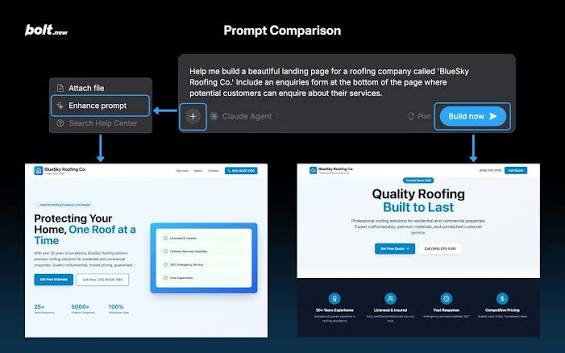
A visual example of a structured prompt workflow, not an independent quality test.
Managed model routingMaxNo equivalent named builder modeForgeN/AGLM 5.3 / Kimi K3 / DeepSeek v4 Pro experimentsManaged routingDefault model persistence in TeamsNot highlighted as equivalentSupportedBroad model/connectors ecosystemSupported through app integrationsGPT-Live and other model integrations announcedModel / API integrations possiblePerplexity, Firecrawl, Parallel and connector ecosystemContext connectors / MCPCloud dev serversWebContainersBroader app-side AI ecosystemMore explicit builder-agent choiceBuilder Agent & AI Mode Coverage
Named modes / capabilitiesCompare the same multi-step task, record revisions and inspect the final code. A screenshot or single prompt is not a credible benchmark of agent quality.
Hidden Limits, Constraints and Trade-Offs
The limitations most likely to matter emerge after a project grows: variable usage, context size, package support, background tasks, deployment controls and project portability. Some limits are technical, while others are tied to plan tiers or practical workflow friction.
Bolt.new’s developer surface may make certain constraints easier to identify and work around. Lovable’s guided experience can reduce setup friction, but every abstraction has boundaries. Make a list of the requirements you cannot compromise on before committing to either platform.
NoExpo-compatible mobile pathLovable platform functions / web stackJavaScript / Node.js onlyBrowser-basedMobile browsers not fully supportedEnterprise private previewEnterprise BYOKNo native importSubject to Figma API rate limitsEnterpriseTeamsNot availableDepends on Expo ecosystemStronger web focusBroader output surface despite JS/backend limitsOutput & Constraint Surface
Documented limitsWe do not treat every missing checklist feature as a permanent product limitation. Check release notes, current documentation and the specific plan before making the final decision.
Usage Controls and Model Selection
When AI-assisted development becomes a daily activity, spending controls and access to the available AI modes affect predictability. Teams should understand exactly what each action consumes and what happens at the limit.
Bolt.new offers technical usage controls appropriate to its token-oriented workflow, while Lovable organizes its own credit and workspace controls. Do not convert one model directly into the other without real task-level measurements.
Credit system + free grantsNo daily token limitOn-demand credit top-upsPlan / token-tier changesManaged Lovable routingStandard / Max / ForgeNot a highlighted controlSupportedChat Mode avoids unnecessary editsPlan Mode uses fewer tokens than Build ModeGood workspace controlsMore explicit model and token controlsTeams managing shared credit budgetsBuilders who actively choose agent/usage modesUsage Control Surface
Documented controlsKeep a lightweight change log of AI requests, credits or tokens consumed, cloud charges, and the amount of human correction required after each major feature.
Value for Money: Total Cost of Getting an App Shipped
Value is the cost of producing and maintaining a useful result, not simply the cheapest monthly fee. A lower-price subscription can still be expensive if it creates more developer work or requires additional external tools.
For a typical web-first team, Lovable’s collaborative product workflow offers strong overall value in our comparison. Bolt.new may represent better value when its code-centric controls replace separate development and Figma-handoff processes.
$50/mo Business$150/mo TeamsYesNo on TeamsProTeamsBusiness $50Enterprise custom134 liveContext connectors / MCPNoExpoNoYesISO 27001 + AIUC-1 in addition to SOC/GDPRSOC 2 II + GDPR + CCPACloud builderWebContainersBest team-value package for web-product workBest value when mobile/dev breadth matters moreValue Drivers
Published price + capability contextTry a bounded comparison: build the same small authenticated app in both tools, include one integration, and measure total effort, usage and post-generation fixes.
Who Should Choose Lovable—and Who Should Choose Bolt.new?
Choose Lovable if you are a founder, product manager or team building a browser-based SaaS platform, internal tool or customer portal and want the simplest path through design, integrations and deployment.
Choose Bolt.new if you are a developer or design-to-code team that needs Figma-driven input, direct access to project files and a more technical environment. Both tools can handle overlap; the recommendations refer to the workflows each one serves most naturally.
LovableBolt.newLovableBolt.newLovableBolt.newLovableBolt.newLovableBolt.newLovableBolt.newLovableBolt.newLovableBolt.newLovableBolt.newLovableBolt.newLovableBolt.newLovableBolt.newLovableBolt.newLovableBolt.newLovableBolt.newPersona Decision Balance
Derived from matrix rowsIf both descriptions fit your situation, run a one-week proof of concept against the same acceptance criteria and inspect the actual project, not only the preview.
Code Portability, Exports and GitHub Integration
Good software can outlive the builder that generated it. For a long-lived project, preserving a conventional repository, documentation and reproducible dependencies reduces lock-in risk.
Bolt.new’s approach makes code structure a visible part of the workflow. Lovable also offers source-control options. The important distinction is not a simple “GitHub: yes/no” cell, but how reliably each service handles code ownership, changes, rollbacks and work outside its own interface.
Git-connected workflowExplicitly supportedGit workflowSupportedSync-generated changesRuntime-checked auto-pushEnterpriseTeamsStrongStrong + browser dev workflowExcellentSlight edge for Git-centric developer controlsCode Portability Controls
Documented Git / exit pathsBefore committing, test a complete repository handoff: clone, install, configure secrets in a safe environment, run the application, and deploy it without relying on the original AI chat session.
Developer Control, Files and Runtime Tools
Developers often need to examine source files, inspect errors, update packages and understand the execution environment. Bolt.new’s interface exposes these tasks inside the development workspace rather than hiding them behind the generation step.
Lovable’s more guided interaction can save time for interface-oriented work. A team that needs deeper technical control may prefer Bolt.new, especially when debugging complex integrations or adapting nonstandard project structure.
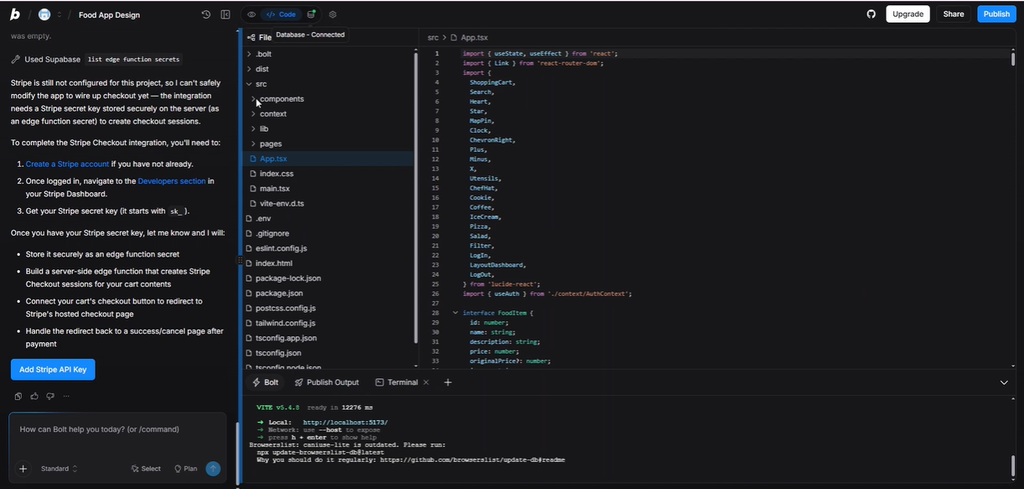
Bolt.new workspace showing project files and a development runtime.
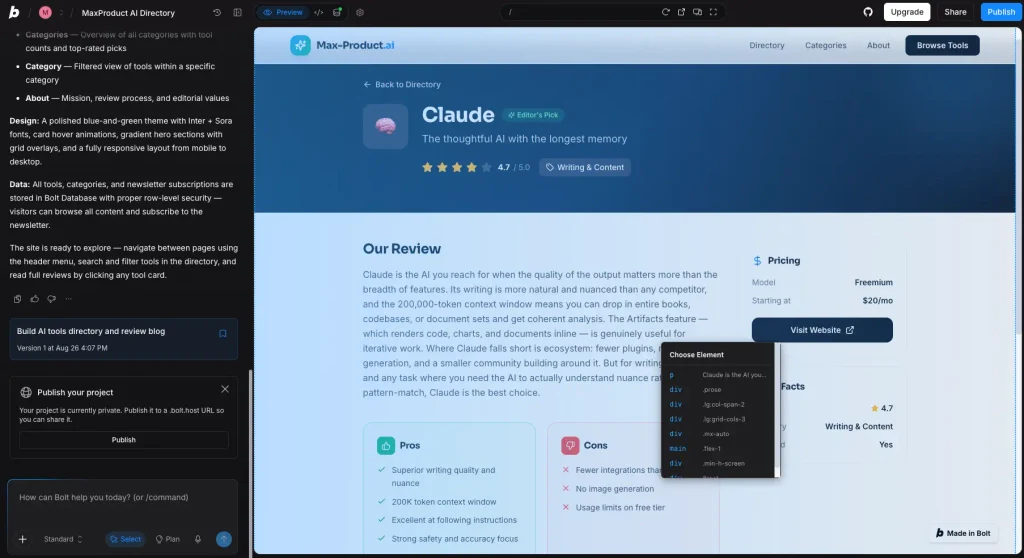
Element selection illustrates the relationship between visual output and code work.
Not primaryCore workflowGitHub syncSupportedManaged routingStandard · Max · ForgeNot highlightedTeams settingWorkspace governanceTeams GitHub / Netlify / Supabase controlsWorkspace publishYesWorkspace identity controlsTeams domain whitelistStrong workspace governanceStronger developer-operating controlsDeveloper Control Surface
Selected operating controlsThis is a workflow assessment, not a claim that either platform automatically produces safer or better code. Review and testing remain essential.
2026 Product Direction and Expansion Signals
Both vendors are expanding quickly into new capabilities. Lovable is investing in managed applications, integrations and business workflows; Bolt.new continues broadening its design-to-code and developer-oriented feature surface.
A capability roadmap is important context, but it is not a service-level guarantee. We have weighted currently described functionality and the product direction visible in releases rather than speculative future promises.
Web focusExpo workflowNo native Figma importFigma importNo named equivalentForgeGrowth planning / execution announcedNot a core product pillarBroader business-platform expansionFaster expansion of builder/developer controls2026 Product Expansion Signals
Selected official launches, not a scoreChoose according to what you can use now. Product announcements should inform, not replace, requirements testing and procurement checks.
Final Decision Matrix: Lovable or Bolt.new?
Lovable is WebKepler’s overall pick for a typical web-first team. It combines visual editing, web-product workflows, connectors and collaboration economics in a coherent environment. Those strengths matter to SaaS founders and organizations that need to ship useful browser-based applications repeatedly.
Bolt.new is a serious alternative—and the better choice for several categories. Figma-centered iteration, source files, developer controls and broader technical exploration can be decisive for code-oriented teams. The matrix below summarizes the trade-offs across the use cases in this article.
LovableBolt.newLovableBolt.newLovableBolt.newLovableBolt.newLovableBolt.newLovableBolt.newLovableBolt.newLovableBolt.newPrivate previewMore mature BYOK storyLovableBolt.newLovableBolt.newLovable for most web-product teamsBolt.new when mobile / Figma / deeper dev control mattersFinal Decision Outcome
Derived from final matrixThe final winner represents a declared editorial use case. It does not mean Bolt.new is objectively inferior at every task—or that either product can replace standard security review, testing and operations.
How WebKepler Evaluated These Platforms
This comparison uses the 31 structured sections and category winners supplied with the current WebKepler component dataset. The tables are the factual and editorial comparison layer; graphs visualize the values defined in that dataset. A chart or a rating should not be read as a measured benchmark when no test protocol is attached.
Our criteria include the end-to-end development workflow, design control, integration availability, plan economics, collaboration, project ownership, infrastructure options and team fit. Editorial results depend on the intended audience: a SaaS founder and a developer importing Figma components may reasonably choose different winners.
When a table illustrates scenario costs or capability scores, treat the numbers as a model unless the table identifies a verifiable source and test method. Screenshots show product interfaces and documented workflows, not independent evidence of speed, security, availability or code quality.
Primary Sources and Verification
The comparison draws on the platforms’ public descriptions and pricing information. Readers can verify the main topics at Lovable Pricing, Bolt Pricing, Lovable Visual Edits, Lovable Connectors, Lovable Security, and Bolt’s Figma import announcement.
Links to official product documentation are provided as references, not as proof that either product is superior in every use case. Any promotional rate, feature entitlement or product restriction may change after publication.
Editorial Disclosure
WebKepler may earn a commission when readers buy through affiliate links. Commissions should not alter the category evidence, the displayed trade-offs, or the explicit editorial criteria. Readers should independently confirm pricing and suitability before purchasing.